
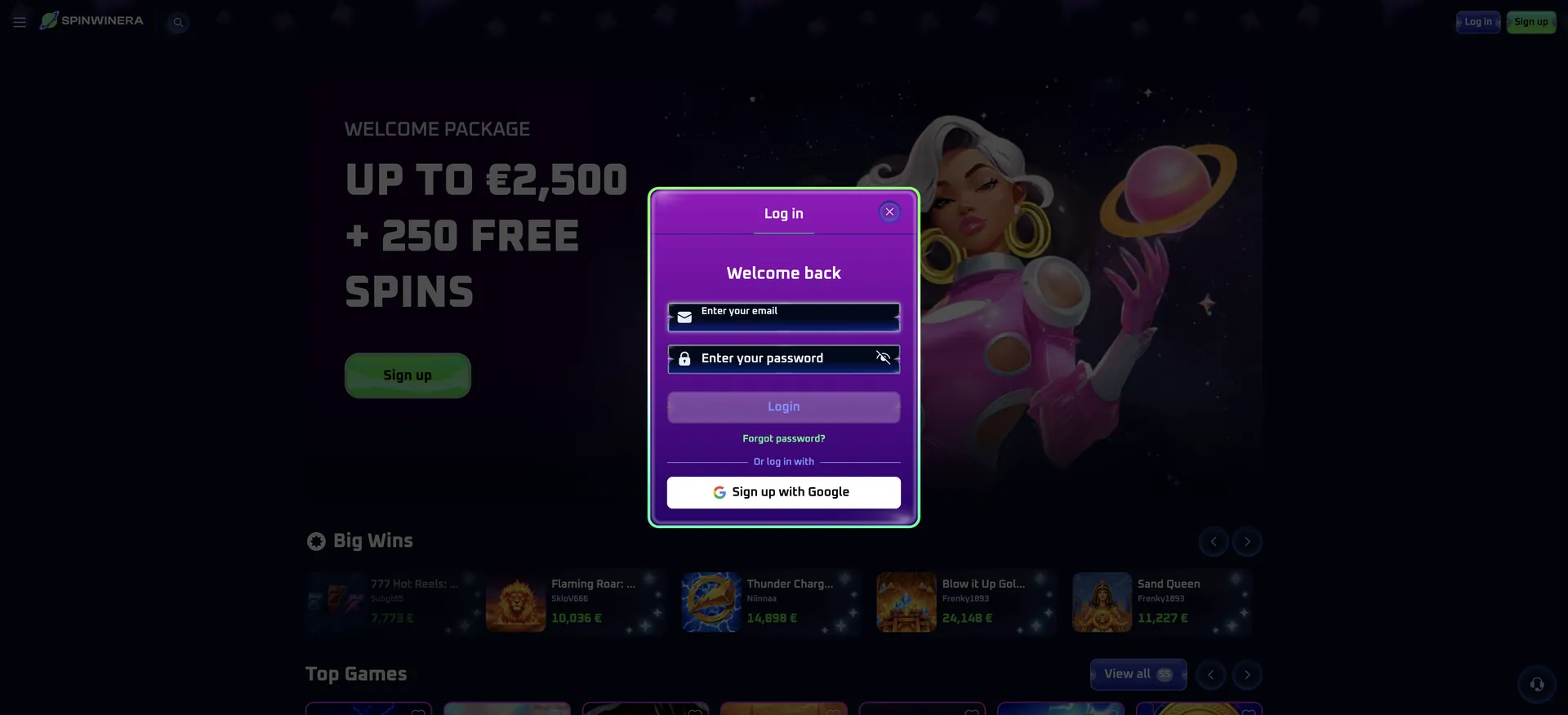
The Spinwinera login button sits in the top-right corner of every page, next to Sign up. Clicking it opens a "Welcome back" window where you enter your email and password, or sign in with your Google account in one click. The same window works on desktop and in mobile browsers. If the details are not accepted, use the Forgot password? link under the Login button to reset your password by email. If the account itself is blocked, the 24/7 live chat can unlock it.
Login security at Spinwinera casino relies on SSL encryption, a password that only the account holder knows, and fraud monitoring that flags unusual activity. This guide covers each step of signing in, password recovery, mobile access, the most common errors and what changes once verification is requested.
| Login essentials | Details |
|---|---|
| Where to log in | "Log in" button, top-right corner of any page |
| Login method | Email + password, or Google account |
| Password visibility | Eye icon in the password field shows or hides characters |
| Password reset | "Forgot password?" link, confirmation by email |
| Device support | Desktop and mobile browsers, installable web app |
| Session security | SSL encryption, fraud and intrusion monitoring |
| When verification appears | At the first withdrawal, or earlier on request |
| Currency | AUD for Australian accounts |
| Support | 24/7 live chat and [email protected] |
How to log in to Spinwinera casino
Signing in takes less than a minute. The login window opens on top of the current page, so after signing in you stay where you were - on a game, a promotion or the cashier.
Step-by-step login with email
This is the standard method for accounts created with an email address and password.
- Open the official Spinwinera site in your browser.
- Click the blue Log in button in the top-right corner.
- Type the email address you used at registration into the "Enter your email" field.
- Enter your password; tap the eye icon if you want to check what you typed. Passwords are case-sensitive.
- Click Login. The window closes and your balance appears in the header.
Login with Google
Accounts created through Google do not have a separate casino password. Under the line "Or log in with", click the white Google button, choose the same Google account you used at sign-up and confirm. If a different Google account is selected, the casino treats it as a new user rather than signing you in, so it is worth checking which profile is active in the browser first.
No account yet? Create one first
The login window only works for existing profiles. New players need to register first through the green Sign up button next to Log in. Only one account per person, household, IP address and device is allowed, so a new registration should never be used as a workaround for a forgotten password.
Quick registration flow
Registration and the first login happen in one go:
- Click Sign up in the top-right corner.
- Enter an email and password, or use Sign up with Google.
- Check that the currency is AUD and the country is Australia - the country cannot be changed later.
- Confirm the form; you are signed in automatically and can complete your profile under Account > Profile.
Secure login practices
The terms place full responsibility for login details on the account holder: anyone who signs in with the correct email and password is treated as the owner, and their actions count as yours. A few habits keep the account safe:
- Use a unique password that is not used for email or other sites.
- Do not let the browser remember the password on shared or family devices.
- Never share login details with anyone, including friends or people offering "account help".
- Sign in only through the official domain, and check the address bar before typing a password.
- Log out after playing on a public or work computer.
- Report unknown transactions or balance changes to support straight away.
Spinwinera password recovery
If the password is forgotten, the reset is handled by email. That is why a valid, accessible email address is required at registration - without it, the casino cannot help recover the account.
Reset steps
The process takes a few minutes, depending on how quickly the email arrives.
- Click Log in, then Forgot password? under the Login button.
- Enter the email linked to your account and submit.
- Open the reset email (check spam and promotions folders if it is not in the inbox).
- Follow the link and set a new password.
- Return to the site and sign in; a confirmation email is sent once the password is updated.
Accounts created with Google do not need a password reset - access is restored through Google account recovery instead.
Spinwinera login on mobile
On phones the layout is compact: the side menu hides behind the hamburger icon on the left, while Log in and Sign up stay visible at the top right. The login window is the same as on desktop, with email, password and Google options.
Tips for mobile
A few details make mobile sign-in quicker and smoother:
- Install the web app from the "Install the Casino App" button in the side menu to open the casino from your home screen.
- Use the phone's built-in password manager rather than writing the password down in notes or messages.
- Allow pop-ups for the casino domain if the Google sign-in window does not open.
- If the session drops when switching between apps, refresh the page - the balance and game history are saved on the server.
Troubleshooting common Spinwinera login errors
Most login problems fall into a few categories, and each one has a simple fix. The sections below explain the cause and what to do next.
Incorrect email or password
The most frequent cause is a typo or an old password. Check that Caps Lock is off, use the eye icon to view the password, and make sure the email is the one used at registration. If you originally signed up with Google, the email-and-password form will not work - use the Google button instead. After that, use password recovery.
Browser or cache issues
If the login window opens but does not respond, or you are logged out straight after signing in, stored browser data or an extension is usually the cause.
- Clear cookies and cache for the site, then reload.
- Disable ad blockers or script blockers for the casino domain.
- Try another up-to-date browser such as Chrome, Safari or Firefox.
- Allow pop-ups if the Google sign-in window does not appear.
"Spinwinera cannot be accessed" message
This notice appears when the site detects a location from which it does not accept players, often because a VPN or proxy is switched on. Turn the VPN off and refresh the page. Using a VPN to change location breaks the terms and can lead to winnings being forfeited, so it should never be used to get around the message.
Account suspended or blocked
An account can be suspended during security checks, when a duplicate account is detected on the same device, IP address or browser, or after a breach of the terms. A self-excluded account also cannot be accessed until the exclusion period ends. In all these cases, contact support through live chat or [email protected] for details; a new registration will not solve the problem and may lead to further restrictions.
Long-inactive account
Accounts with no login for 12 consecutive months are marked inactive. They still open with the usual details, but a monthly fee of about AUD 17 may have been deducted from any remaining balance. Logging in reactivates the account and stops the fee.
What you access after Spinwinera login
Once signed in, the full account area becomes available. The main sections are:
- Cashier: deposits, withdrawals and the current withdrawal limit for your loyalty rank.
- Account > Profile: personal details, email and phone number changes.
- History: deposits, withdrawals and game history, filterable by date and type.
- Bonuses and Activities: active offers, free spins, tournaments and the Mighty Wins Lottery.
- Loyalty and VIP Club: current rank, rakeback and cashback.
- Responsible Gaming: deposit, wagering and loss limits, plus self-exclusion.
Account verification (KYC)
Logging in does not require documents, but withdrawals do. Verification is usually requested at the first withdrawal, and the casino can ask for it at any stage, including after a deposit. Documents are uploaded from the account and must be readable, unedited and in the account holder's name.
The standard set includes a passport or ID card, proof of address no older than 6 months, and a photo of the front of the payment card showing the first 5 and last 4 digits. A selfie with the ID, a phone call or a short video check may also be requested. Uploaded files get a "Temporarily Approved" status, and the KYC team responds by email, usually within 24 hours. Documents must be provided within 15 days of a request, otherwise the account can be restricted.
FAQ about Spinwinera login
Quick answers to the login questions Australian players ask most often.
Where is the Spinwinera login button?
In the top-right corner of every page, in blue, next to the green Sign up button. On mobile it stays in the same place.
Can I log in to Spinwinera with Google?
Yes. The login window has a "Sign up with Google" button under "Or log in with". It works for accounts created through Google.
I forgot my password. What should I do?
Click Forgot password? in the login window, enter your email and follow the link in the reset message. A confirmation email arrives once the new password is saved.
Can I change the email I log in with?
Yes, under Account > Profile. If the email has already been verified, the change has to go through support.
Why was I logged out or blocked?
Common reasons are a VPN, a duplicate account on the same device or IP address, a security check, or self-exclusion. Live chat can explain the specific reason.
Do I need to verify my account to log in?
No. Verification is needed to withdraw, not to sign in or deposit, but the casino can request documents at any time.
Can I use the same login on my phone and computer?
Yes. One account works on all devices, including the web app, with the same balance and bonuses.
Updated on 21 November 2026.